Make your mic behave.
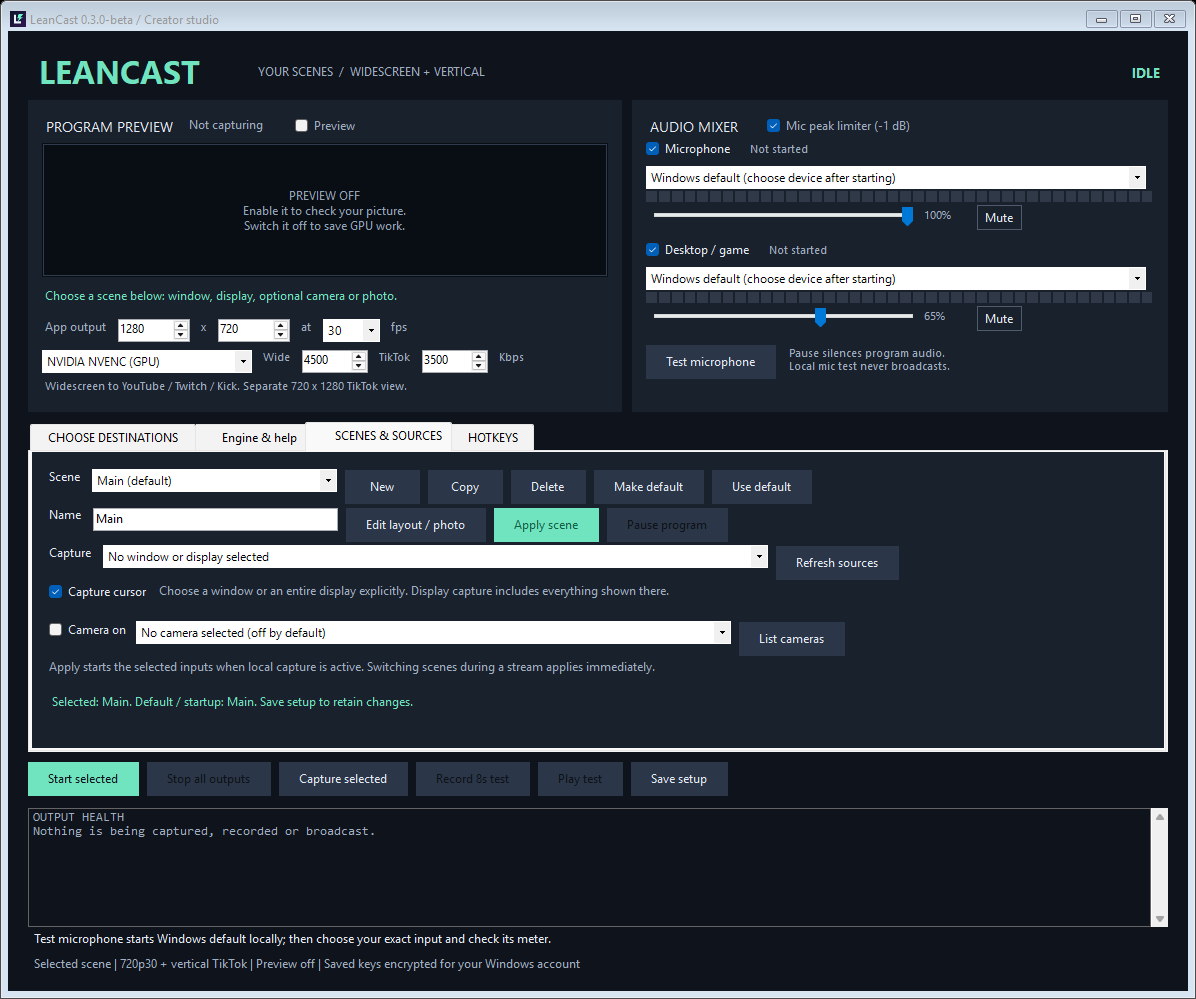
Choose an input, watch the level meter, adjust volume, mute from the mixer, and enable a peak limiter. Desktop audio has its own controls.
OPEN SOURCE. ON YOUR PC.
Your content. Your layouts. Your stream.
A focused desktop app for going live in widescreen and portrait, with the controls that make it yours.
Free beta · Windows x64 · OBS 30.x engine required
Tested on OBS 30.1.2 with NVIDIA NVENC. Check your setup.
BUILT AROUND YOUR STREAM
Choose a window or display, add an optional camera, and arrange your scene. LeanCast shares the widescreen encode across selected landscape destinations and creates a separate portrait output for TikTok.
Window or display.
Optional camera + background.
One shared H.264 encoder
Your own portrait composition
Each destination still needs its own upload bandwidth. This is a local streaming app, not a cloud restreaming service. Separate layouts still cost GPU time.
Choose an input, watch the level meter, adjust volume, mute from the mixer, and enable a peak limiter. Desktop audio has its own controls.
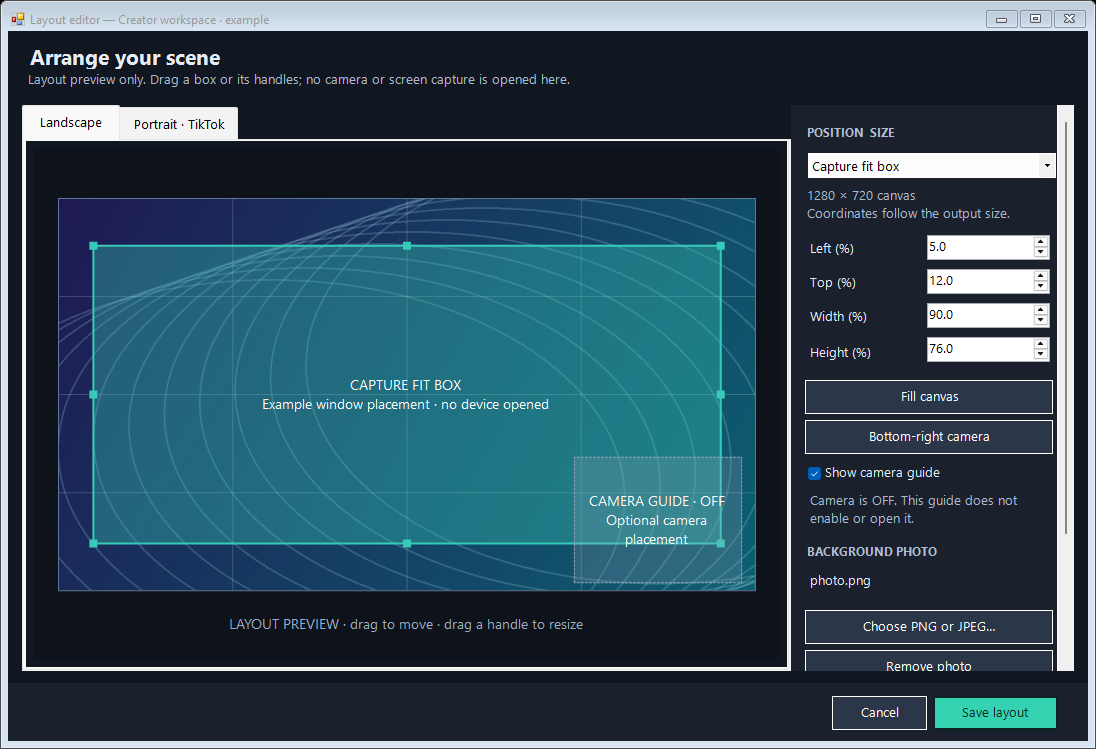
Drag and resize your video and optional camera separately in each format. Add a PNG or JPEG background and save the arrangement as a scene.
Keep multiple scenes, choose your default, and switch while streaming. The Go Live shortcut loads your saved setup and checks it before a cancellable countdown.
Assign global shortcuts for microphone mute, desktop audio mute, pause, and scene switching. Enable them when you want them; conflicts with other apps are reported.
Pause sends a break screen and silences broadcast audio while keeping stream connections open. Resume returns to your scene and current mixer settings.
Scenes and encrypted stream credentials stay on your PC. Your background images stay in the folders you choose. There is no web account or cloud subscription.
YOUR CONTROL ROOM
Choose your scene, check your audio, and start streaming. Keep your camera off or explicitly select one. The preview starts off, and the app can minimize to the tray.
A PLACE FOR EVERYTHING
Drag your source into place. Resize the camera. Choose a background photo. Build the widescreen scene and its portrait counterpart, then save them together.
MEASURED, NOT MAGIC
Small software should come with clear measurements. Here are this release’s results, hardware, and test boundaries.
| Workload | LeanCast memory working set / private | LeanCast CPU | OBS memory working set / private | OBS CPU |
|---|---|---|---|---|
| Fresh app idle | 53.9 / 31.1 MiB | 0.09% | 115.4 / 150.1 MiB | 0.20% |
| One 720p30 synthetic recording | 256.7 / 372.9 MiB | 1.23% | 282.2 / 399.4 MiB | 1.24% |
| Four local outputs, two layouts | 322.0 / 533.5 MiB | 1.38% | No matched comparison | — |
Measured October 7, 2026 · Ryzen 9 5900HS / 16 logical processors · RTX 3050 Ti Laptop · Windows 11 · OBS engine 30.1.2. Three trials, 5-second warmup + 20-second measurement per phase. Preview off; both apps minimized. Moving synthetic video, silent audio. Active settings: NVENC H.264 P3, 720p30, 3,500 kbps, plus AAC 160 kbps.
Memory is aggregate process working set / private allocated bytes; shared pages may be counted more than once. Idle compares normal app behavior: LeanCast’s media engine is unloaded; OBS’s is initialized. Four-output measurements use a local receiver and have no matched OBS result. The exact measured 0.3 source snapshot is included with the download.
These short tests use generated video without physical cameras or microphones. They do not establish game FPS, end-to-end latency, real-platform acceptance, or long-session stability. TikTok LIVE Studio was not benchmarked.
Summary JSON · Trial results CSV · Raw samples · Hardware, settings & source hashes · Release validation
LeanCast uses libobs for capture, mixing, encoding, and streaming. Its smaller interface removes many studio features. It is a focused alternative for this workflow; the measurements do not establish that it is the lightest streaming app in the world or faster for every game and computer.
KNOW BEFORE YOU GO LIVE
LeanCast sends H.264 video and AAC audio using RTMP or RTMPS. Bring an eligible account, the server address, and its stream key. A platform button does not grant broadcasting access.
| Destination | Layout | Before you connect |
|---|---|---|
| YouTube | Widescreen | Enable live streaming, create a broadcast, and turn on auto-start to start the intended broadcast. Check its privacy setting separately. |
| TikTok | Portrait | Requires TikTok-approved direct encoder access and a server/key. LIVE Studio access alone may not include a stream key. |
| Twitch | Widescreen | Copy the stream key and use a supported ingest server. Follow Twitch’s current simulcasting requirements. |
| Kick | Widescreen | Set your title and category on Kick, then copy its server and key. Keep video within Kick’s supported limits. |
Verification boundary: Four simultaneous local RTMP outputs have been exercised through scene changes, pause, and resume. Recorded output is checked with an independent decoder. Live ingestion by these four services and RTMPS interoperability have not yet been verified for this release. Platform policies, account restrictions, and network conditions can still prevent a broadcast.
Platform setup guide and official links
At the default video rates plus 160 kbps audio per destination. Allow additional headroom for network overhead and the game.
FREE TO USE. FREE TO INSPECT.
Download the beta, build it yourself, or read every line. The source travels with the release.
Version 0.3.0-beta · GPL-2.0-or-later · No subscription
Executable + complete application source; OBS installed separately.
Verify download checksums · Setup & build guide
OBS 30.1.2 is an older release. Do not replace a maintained OBS installation to try this beta. The OBS installation is an additional dependency, excluded from the small LeanCast download size. The executable is unsigned; no publisher certificate or SmartScreen reputation is claimed. Inspect the source and checksums before running.
Official tested OBS release & sourceA FEW STRAIGHT ANSWERS
LeanCast supplies its own control panel and uses OBS’s installed engine. OBS Studio’s main interface does not need to run alongside it. TikTok LIVE Studio can only be replaced when TikTok gives your account direct encoder access. LeanCast cannot unlock or extract access that TikTok has not granted.
Yes. Choose between one and four destinations. Only enabled destinations require credentials. TikTok uses the portrait output; the other three use the widescreen output.
Only when you choose those sources. Cameras start disabled; select a device and enable it for the scene. Window capture uses the selected window, and display capture uses the selected display. Desktop audio captures your chosen playback device, which can include other applications.
A scene holds its source, camera settings, background images, and separate widescreen and portrait placements. Create or duplicate a scene, edit both canvases, and save it. Choose the default for your next launch, then switch between scenes from the dashboard or your configured shortcuts. Keep referenced image files in place.
Pause keeps active connections open and replaces your content with a break screen. Microphone and desktop audio are silent in the broadcast. Resume restores the scene and respects your current mute and volume settings. Stop ends the outgoing connections.
In a local profile encrypted with Windows DPAPI for your Windows user account. The website has no stream-key form. Keys are sent to the ingest servers you configure; use a platform-provided RTMPS address when available. Anyone who can run software as your Windows user may be able to decrypt the profile.
No. It means the app is sending data to the server. Check the destination’s dashboard for stream health, public visibility, title, and category. YouTube may wait for you to press Go Live unless auto-start is enabled.
Game frame-rate impact, physical camera and microphone combinations, real platform ingestion, RTMPS interoperability, and hardware beyond the tested system. Synthetic/local tests cannot establish those outcomes. Treat this as an early beta, test your setup, and keep a working fallback.
Yes. The release includes the complete application source, build scripts, tests, and GPL-2.0-or-later licensing. OBS is a separate open-source project with its own licenses and source. There is no public issue tracker yet; use the project inquiry link below for release feedback, and never send stream keys.